
- jq懒加载插件 https://github.com/tuupola/jquery_lazyload
三步走 data-original属性 图片宽高必须设置一个 调用lazyload方法,配置相关参数 - 腾讯视频开发文档 http://v.qq.com/open/doc/tvpapi2.0.pdf
- 3.文字溢出处理
1
2
3
4
5
6
7
8
9
10
11
12
13
14<!--单行溢出-->
.one_txt_cut {
overflow: hidden;
white-space: nowrap;
text-overflow: ellipsis;
}
<!--多行溢出-->
.txt_cut {
overflow: hidden;
text-overflow: ellipsis;
display: -webkit-box;
-webkit-line-clamp: 2;
-webkit-box-orient: vertical;
}
宝塔代理配置
1.下载宝塔,安装所需环境webserver使用nginx,php使用共生版本
2.点击网站,创建网站,填写域名和对应文件夹路径,根目录为项目文件的路径;
3.点击环境,nginx旁边的小文件夹打开vhost文件夹下的对应域名的config文件
3.修改对应域名的config文件,在config文件下添加以下代码
location /api/{
proxy_pass http://m.yl.test.tkinghr.com/api/;
}
js中ajax请求就使用/api/+完整路径,例如/api/act/ridSingle/saveActRidSingle,http://m.yl.test.tkinghr.com/api/;是48测试服的接口路径,如果需要和后端本地联调,改成对方的ip地址即可。
如果完整的请求地址是这样的http://m.yl.test.tkinghr.com/mall/act/ridSingle/saveActRidSingle;则需要按下面的方法修改config文件,其实本质是webserver会将“/api/"映射成http://m.yl.test.tkinghr.com/api/,对本地请求做个代理,便不会产生跨域,上线后服务器上是不存在跨域的,所以这样做就可以同时保证代码上线后又能访问到正常接口地址;
location /mall/{
proxy_pass http://m.yl.test.tkinghr.com/mall/;
} js中ajax请求就使用/mall/+完整路径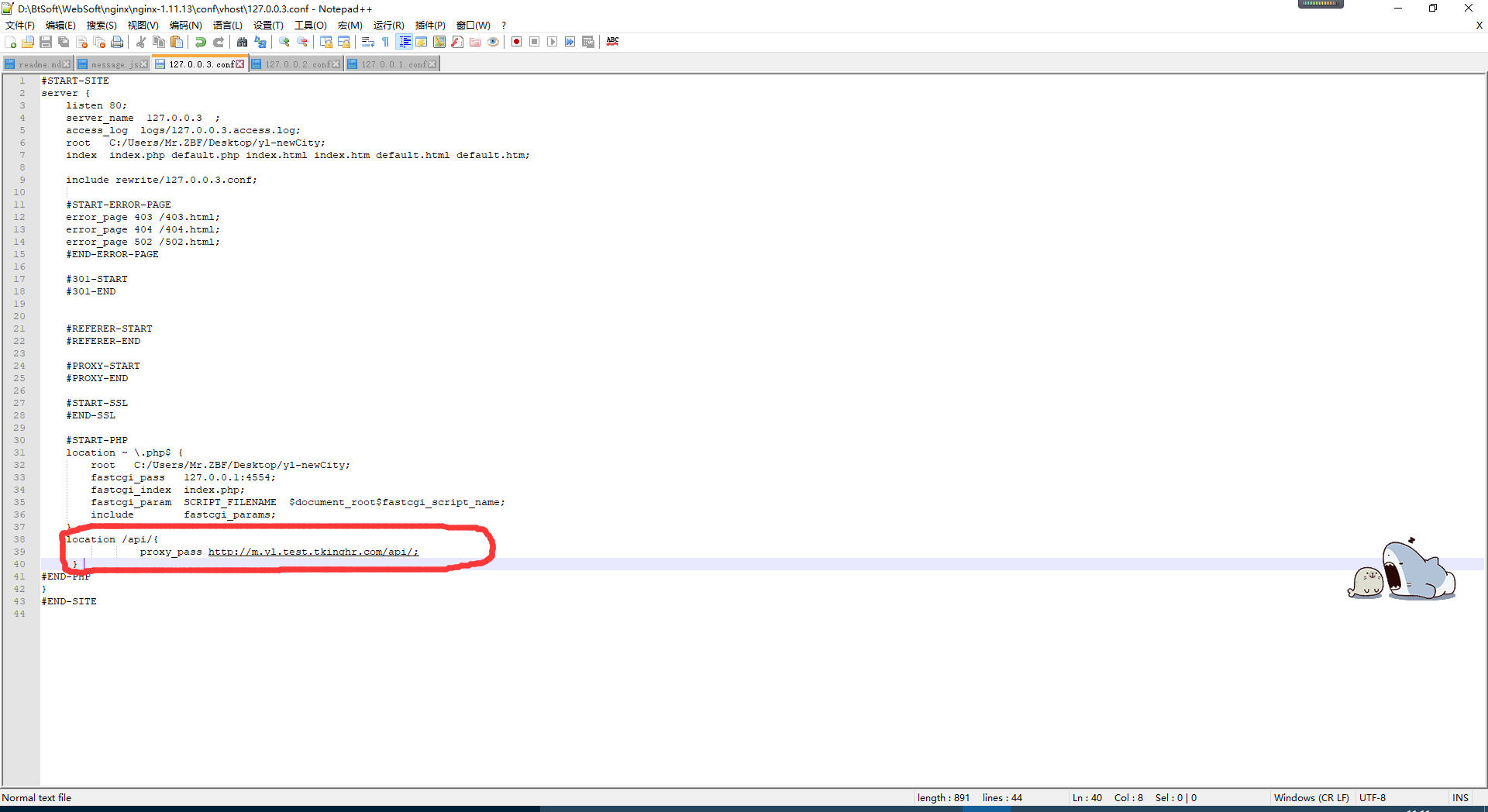
4.重启宝塔;
5.在浏览器中通过对于域名加文件路径访问页面,例如127.0.0.3/index.html; 127.0.0.3会映射成你项目的根路径,所以直接补全页面的路径就可以访问,至此即可解决跨域问题,调试时使用127.0.0.3跑项目即可;
IOS中position:fixed的弹出框中的input出现光标错位的问题
1 | <!--弹框出现的时候给body加上如下的类--> |
js调用原生app的方法;
1 | //andriod |
淘宝rem布局(flexible.js)
- flexible的原理是将屏幕分成100份,所以设计图的尺寸除以100即是rem的基准值(750的设计图1rem=75px,640的设计图1rem=64);
- flexible会根据设备的dpr来更改viewport的缩放比例,所以无需设置视口meta标签;
- 在引入所有资源之前引入flexible.debug.js和flexible_css.debug.js;
js唤醒app(app存在则跳转,不存在则跳下载链接,ios直接跳转appstore)
- js唤醒app需要app端的配合,可采用两种方式(iframe和window.location),但有些手机浏览器不支持iframe,故采用window.location的方式进行跳转。
方式一 window.location的方式跳转
1
2
3
4
5
6
7
8
9
10
11
12
13
14
15
16
17
18
19
20
21
22
23
24
25// 获取浏览器信息
var usertype = window.navigator.userAgent,
appSrc = {
ios: "YouLanW://",
android: "youlan://daile.com/launcher"
},
downloadSrc = {
ios: "https://itunes.apple.com/cn/app/id1071374655?mt=8",
andriod: "https://t.growingio.com/app/at2/QPDLNrPN_o"
};
//开启定时器给用户一个缓冲时间
window.setTimeout(function () {
// 对客户端进行判断(ios和安卓端),跳转对应的链接(链接由ios和Android的开发人员提供),如果手机上存在app就会跳转,不存在就会跳转对应链接
if (usertype.indexOf('Android') > -1 || usertype.indexOf('Linux') > -1) {
window.location.href = appSrc.android ;
window.setTimeout(function () {
window.location.href = downloadSrc.android;
}, 1000)
} else if (usertype.indexOf('iPhone') > -1 || usertype.indexOf('iPad') > -1) {
window.location.href = appSrc.ios;
window.setTimeout(function () {
window.location.href = downloadSrc.ios;
}, 1000)
}
}, 1000);方式二 iframe的方式跳转
1
2
3
4
5
6
7
8
9
10
11
12
13
14
15
16
17
18
19
20
21
22
23
24
25
26
27
28
29
30var usertype = window.navigator.userAgent,
ifrSrc = {
ios: "YouLanW://",
android: "youlan://daile.com/launcher"
},
downloadSrc = {
ios: "https://itunes.apple.com/cn/app/id1071374655?mt=8",
andriod: "https://t.growingio.com/app/at2/QPDLNrPN_o"
},
ifr = document.createElement('iframe');
ifr.style.display = 'none';
if (usertype.indexOf('Android') > -1 || usertype.indexOf('Linux') > -1) {
ifr.src = ifrSrc.android;
document.body.appendChild(ifr);
ifr.onerror = function () {
ifr.src = downloadSrc.andriod;
}
window.setTimeout(function () {
document.body.removeChild(ifr);
}, 2000);
} else if (usertype.indexOf('iPhone') > -1 || usertype.indexOf('iPad') > -1) {
ifr.src = ifrSrc.ios;
document.body.appendChild(ifr);
ifr.onerror = function () {
ifr.src = downloadSrc.ios;
}
window.setTimeout(function () {
document.body.removeChild(ifr);
}, 2000)
}